graphQL을 한번도 안써본 사람이 graphQL API와 연동하기까지의 과정과 그 속에서 했던 고민들을 공유하려고 한다.
GraphQL이란?
GraphQL은 Facebook에서 개발된 오픈소스 기술로 데이터 질의 (Query + Schema) 언어이다. [출처]
sql은 데이터베이스 시스템에 저장된 데이터를 효율적으로 가져오는 것이 목적이고, gql은 웹 클라이언트가 데이터를 서버로 부터 효율적으로 가져오는 것이 목적입니다. [출처]
GraphQL은 REST같은 API 디자인에 관한 새로운 관점의 스펙이다. GraphQL의 핵심은, 리소스를 url이 아니라 Query를 통해 표현하는 것이다. [출처]
적합한 설명을 찾다가 제일 이해하기 쉽고 직관적인 3가지 문장을 가져와봤다.
결국 GraphQL은 REST의 단점을 보완하기 위해 개발된 기술이기 때문에, REST와 동일하게 HTTP 프로토콜 위에서 동작한다.
| REST | GraphQL | |
| endpoint | 리소스 별 여러 endpoint | 단일 endpoint |
| data | 고정된 구조 | 클라이언트가 정의한 구조 |
| error | status code로 구분 | 에러 메세지로 구분 |
| cache | 쉬움 | 어려움 |
이렇게 단정지어서 표로 구분하면 무조건 이런 특성을 갖는다는 오해가 있을 수 있지만(마치 checked exception에 대한 백기선님의 따끔한 영상처럼), 처음 맛보는 GraphQL이기 때문에 직관적으로 이해하는 것이 제일 중요하다고 생각해서 가져와봤다.
기본 개념
Query / Mutation
데이터를 읽을 때 REST에서는 GET, POST, PUT, DELETE 등의 Method로 행위를 구분한다.
GraphQL에서는 행위를 2가지로 구분하는데 Query, Mutation이다. REST와 비교한다면 다음과 같다.
| REST | GraphQL |
| GET | Query |
| POST / PUT / PATCH / DELETE | Mutation |
- Query
조회하려는 필드(객체)를 입력하고, 중괄호에 원하는 필드를 추가하면 된다. 아래 예제는 user의 id, name을 조회하는 요청이다.
# request { user { id name } } # resposne { "data": { "user": { "id": "1", "name": "kyun" } } } - Mutation
사용하려는 함수(?)와 함께 input을 넣는다. 그리고 중괄호에 return 받을 필드를 입력한다. 아래는 name으로 유저를 생성하는 요청이다.
# request
mutation {
    createUser(name: "kyun") {
        id
        name
    }
}

# resposne
{
    "data": {
        "createUser": {
            "id": "1",
            "name": "kyun"
        }
    }
}
Query, Mutation 모두 이름을 가질 수 있다. 예시를 보면 쉽게 이해할 수 있는데, 아래 쿼리는 형식만 다르고 결과는 모두 같다.
# 기본 쿼리 형태
{
    user {
        id
        name
    }
}

# query 키워드 추가
query {
    user {
        id
        name
    }
}

# 쿼리 이름(findUserQuery)이 포함된 형태
query findUserQuery {
    user {
        id
        name
    }
}
# 기본 형태
mutation {
    createUser(name: "kyun") {
        id
        name
    }
}

# 쿼리 이름(createUser)이 추가된 형태
mutation createUser {
    createUser(name: "kyun") {
        id
        name
    }
}
Schema / Type / Input
- Type
GraphQL의 기본적인 구성 요소는 타입이다. 객체라고 생각하면 된다. 타입은 api에서 가져올 객체와 그 필드를 나타낸다.
type User {
	id: ID!
	name: String!
	address(city: String): String
}
타입의 모든 필드는 argument를 가질 수 있다. 이는 Query 예제에서 봤던 argument와 동일하지만 의미는 다르다.
query에 존재하는 인자는 필터링, 검색 등 쿼리를 제어하는 역할을 수행하는 반면, type의 field에 존재하는 인자는 필드의 결과를 수정하거나 데이터 처리 방식을 제어하는 역할을 수행한다. (추측하기론 datetime format 과 같은 역할을 할 것으로 예상된다) - Schema
Schema는 API의 구조의 기능을 정의하는 것이다. 위 query와 mutation을 보면서 api 스펙을 어디에 정의했길래 이게 가능한건지? 라는 생각이 들었다면, graphQL에서는 이를 schema라고 한다.
graphQL에는 3가지의 최상위 타입이 존재하고, 이 타입에 클라이언트가 호출할 수 있는 필드 및 API 구조를 정의한다. 타입은 Query, Mutation, Subscription이 존재하는데 Query와 Mutation만 다루도록 하겠다.
schema {
  query: Query
  mutation: Mutation
}
- Query 정의
type Query {
    user(id: ID): User
    users: [User!]!
}
위 예제는 조회 진입점이 2개인 것을 의미한다. REST로 이야기 하자면 endpoint가 2개인 것과 비슷하다(graphQL에서는 진입점을 한번에 여러개를 사용 가능하다).
user 에서 소괄호 안의 값은 인자이다. 조회 조건으로, id로 유저를 조회하는 것과 동일하다. 뒤의 : 는 return 타입을 정의한다.
users 에서 보이는 ! 는 not null 타입을 뜻한다.
위 스키마를 사용한 예제는 다음과 같다.
# request
{
    user(id: "1") {
        id
        name
    }
    users {
        id
        name
        email
    }
}

# response
{
    "data": {
        "user": {
            "id": "1",
            "name": "kyun"
        },
        "users": [
            {
                "id": "1",
                "name": "kyun",
                "email": "kyun@example.com"
            }
        ]
    }
}
- Query 정의
- Mutation 정의
데이터를 수정하기 위한 진입점을 정의한다.
type Mutation {
    createUser(name: String!): User
    deleteUser(id: ID): Boolean
}
위 mutation 스키마를 사용하는 예제는 다음과 같다.
# request mutation { createUser(name: "kyun") { id name } deleteUser(id: "1") } # response { "data": { "createUser": { "id": "1", "name": "kyun" }, "deleteUser": true } } - Input
인자로 객체를 전달하고 싶을 때 사용하는 타입이다. DTO라고 생각하면 이해가 쉽다. 주로 Mutation에서 사용한다.
input의 필드는 인자를 가질 수 없다. 입력 데이터를 구조화하는 역할이다.input UserInput { name: String! age: Int }
❓ type과 input의 차이는 무엇이지?
→ DTO와 객체의 차이와 비슷하다.Type Input 역할 데이터 모델 정의 데이터 입력 용도 응답 타입 정의 mutation 입력 데이터 구조화
Spring Boot에서 GraphQL 호출하기
GraphQL로 만들어진 외부 API를 호출하기 위한 방법은 3가지가 있다.
HTTP Request
graphQL도 REST와 마찬가지로 http 프로토콜 위에서 동작하는 API이다. 따라서 OkHttp , OpenFeign 과 같은 http client를 사용해서 요청하면 된다. Content-Type 헤더는 application/json 과 application/graphql 모두 사용 가능한 것으로 알고 있지만, request body가 다르고, graphQL api에 따라 허용되는 content type이 다를 수 있다.
내가 연동해야하는 지갑 API의 경우에는 application/json 만 사용 가능한 것으로 확인된다.
val query = """
        {"query": "{ user(id: \"$id\") }"
    """.trimIndent()

val headers = HttpHeaders().apply {
    contentType = APPLICATION_JSON
}

val response = httpPost {
    url("https://example.com/graphql")
    header {
        headers.toSingleValueMap().forEach { (k, v) ->
            k to v
        }
    }

    body {
        body?.let {
            json(it)
        } ?: json("")
    }
}
...
spring-boot-starter-graphql
- 의존성 추가
spring에서 제공하는 graphQL의 client를 활용하기 위해서는 webClient를 사용해야 한다. 따라서 webflux가 없다면 추가가 필요하다.implementation("org.springframework.boot:spring-boot-starter-graphql") // WebClient 사용하기 위함 implementation("org.springframework:spring-webflux") - client 생성
val client = WebClient.buidler() .baseUrl("https://example.com/graphql") .build() val graphQlClient = HttpGraphQlClient.builder(client).build() - api call
val query = """
    query {
        user {
            id
            name
        }
    }
"""

val response = graphQlClient.document(query)
    .executeSync()
⚠️ HttpGraphQlClient 는 MediaType.APPLICATION_GRAPHQL_RESPONSE 을 사용한다. 이는 spring 6.0.3 버전부터 사용이 가능하므로, spring version 확인이 필요하다. [Spring GraphQL 공식문서] [MediaType 공식문서]
Apollo GraphQL (추천)
apollo는 client와 server 모두 사용 가능한, graphQL을 편하게 사용하도록 도와주는 라이브러리이다. [공식 문서]
최신 버전은 v4 이지만, spring 적용하기 위해선 Gradle과 Kotlin version 문제로 v3 를 기준으로 작성하였다. requirements에 부합하는 환경에서는 v4를 사용하는 것을 권장한다. (적용하려는 프로젝트에서는 gradle major version을 올려야 했고, kotlin 버전도 minor 버전을 올려야했기 때문에 바로 v4를 적용하지는 않았다.)
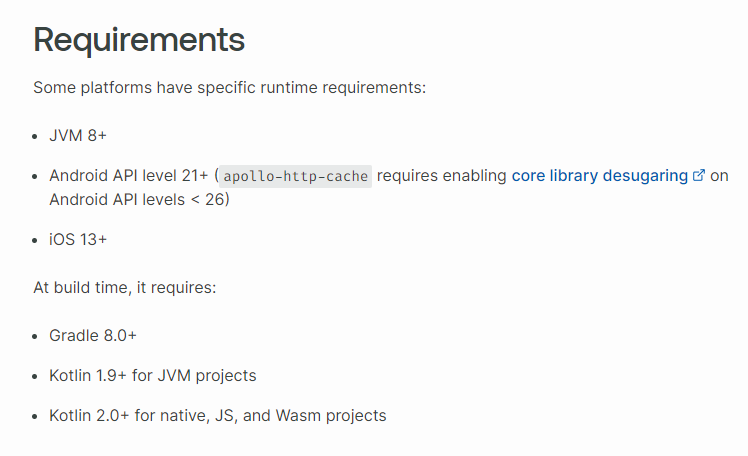
아래 스텝을 따라가면 쉽게 적용할 수 있을 것이다.
- 버전 확인 [공식문서]
- schema.graphqls 파일 추가
사용할 schema가 정의된 파일이다. 해당 파일이 존재하지 않을 경우, 다음과 같은 에러가 발생한다. (gradle sync 작업에서도 에러 발생함) 확장자가 graphqls 임을 주의하자.
No schema file found in:
src/main/graphql
graphql 쿼리 파일들 및 스키마 파일을 둘 directory 를 만든다. 나는 src/main/resources/graphql 경로에 추가하였다. 기본 경로는 src/main/graphql 이다.
아래는 schema.graphqls 예시 코드이다.
type Query { user(id: ID): User } type User { id: ID! name: String! } - 의존성 추가 및 build.gradle.kts 수정
plugins { id("com.apollographql.apollo3") version "3.8.3" } dependencies { implementation("com.apollographql.apollo3:apollo-runtime:3.8.5") } apollo { service("service") { packageName.set("com.example.example") // schema 경로를 변경했기 때문에 추가한 설정임 srcDir("src/main/resources/graphql") } } - graphql 쿼리 파일 추가 및 빌드
당연히 해당 쿼리는 schema의 Query 에 추가되어 있어야 한다.
query FindUserQuery($id: ID!) {
    user(id: $id!){
        id
        name
    }
}
파일을 추가한 뒤 꼭 빌드를 해야한다. 빌드를 해야 FindUserQuery.kts 파일이 만들어지고, 이를 소스코드에 사용할 수 있기 때문이다.
💡 Tip: intellj apollo graphql plugin을 받으면 빌드 안하고 apollo source를 만들 수 있음 - ApolloClient를 사용하여 api 요청
val client = ApolloClient.Builder()
    .serverUrl("https://example.com/graphql")
    .addHttpHeader("Authorization", "kyun")
    .build()

val response = runBlocking {
    client.query(FindUserQuery(id = 1).execute()
}

val result = response.data.findUserQuery
runBlocking을 사용한 이유는, ApolloClient.query().execute 함수가 suspend이기 때문에 coroutine에서 실행하고 결과를 받아오기 위함이다.
TroubleShooting
multi-module project
multi module에서는 하나의 모듈에서만 스키마가 포함되어야 한다. 그리고 다른 모듈이 해당 스키마를 재사용해야한다. (마치 flyway처럼) 따라서 gradle 설정이 달라진다.
- root 경로의 build.gradle.kts 파일
해당 gradle 파일에서는 subproject의 의존성을 관리하기 때문에 apollo 관련 의존성은 여기서 처리한다. plugin은 필요 없기 때문에 제거한다.
subprojects { dependencies { implementation("com.apollographql.apollo3:apollo-runtime:3.8.5") implementation("com.apollographql.apollo3:apollo-api:3.8.5") } } - core의 build.gradle.kts 파일
apollo plugin 기능을 사용해야하기 때문에 plugin을 추가한다.
generateApolloMetadata.set(true) 설정을 추가해야 한다.
plugins { id("com.apollographql.apollo3") version "3.8.5" } apollo { service("service") { packageName.set("com.example.example") generateApolloMetadata.set(true) srcDir("src/main/resources/graphql") } } - public-api의 build.gradle.kts 파일
apollo plugin 기능을 사용해야하기 때문에 plugin을 추가한다.
core 프로젝트의 의 apollo 의존성 추가 해야 사용 가능하다.
plugins {
    id("com.apollographql.apollo3") version "3.8.5"
}

dependencies {
    implementation(project(":udc-core"))
    apolloMetadata(project(":udc-core"))
}


apollo {
    service("service") {
        packageName.set("com.example.example")
    }
}
Multi Modules codegen
For multi-modules projects, Apollo Kotlin enables you to define queries in a feature module and reuse fragments and types from another module dependency. This helps with better separation of concerns and build times. Note: this page is for sharing a schema
www.apollographql.com
NoSuchFieldError: Companion 에러
에러 로그는 다음과 같다.
java.util.concurrent.CompletionException: java.lang.NoSuchFieldError: Companion
    at org.springframework.aop.interceptor.AsyncExecutionAspectSupport.lambda$doSubmit$3(AsyncExecutionAspectSupport.java:281)
    at java.base/java.util.concurrent.CompletableFuture$AsyncSupply.run(CompletableFuture.java:1700)
    at org.springframework.cloud.sleuth.instrument.async.TraceRunnable.run(TraceRunnable.java:64)
    at com.equinix.crh.asset.common.config.ThreadConfig$ContextDecorator.lambda$decorate$0(ThreadConfig.java:84)
    at java.base/java.util.concurrent.ThreadPoolExecutor.runWorker(ThreadPoolExecutor.java:1128)
    at java.base/java.util.concurrent.ThreadPoolExecutor$Worker.run(ThreadPoolExecutor.java:628)
    at java.base/java.lang.Thread.run(Thread.java:829)
Caused by: java.lang.NoSuchFieldError: Companion
    at com.apollographql.apollo3.network.http.DefaultHttpEngine$execute$2$httpRequest$2$2.contentType(OkHttpEngine.kt:56)
    at okhttp3.internal.http.BridgeInterceptor.intercept(BridgeInterceptor.java:53)
    at okhttp3.internal.http.RealInterceptorChain.proceed(RealInterceptorChain.java:142)
    at okhttp3.internal.http.RetryAndFollowUpInterceptor.intercept(RetryAndFollowUpInterceptor.java:88)
    at okhttp3.internal.http.RealInterceptorChain.proceed(RealInterceptorChain.java:142)
    at okhttp3.internal.http.RealInterceptorChain.proceed(RealInterceptorChain.java:117)
    at okhttp3.RealCall.getResponseWithInterceptorChain(RealCall.java:229)
    at okhttp3.RealCall.execute(RealCall.java:81)
    at com.apollographql.apollo3.network.http.DefaultHttpEngine.execute(OkHttpEngine.kt:75)
Caused by: java.lang.NoSuchFieldError: Companion
해당 에러가 발생한 경우는, okhttp 라이브러리가 충돌해서 발생하는 이슈다. [github issue]
apolloClient는 okhttp의 Companion의 toMediaType() 함수를 사용한다. 그러나 okhttp 버전에 따라 해당 함수가 없는 경우가 존재한다. 내 프로젝트의 경우에는 3.14.9 버전으로 dependency 고정되었고, 해당 라이브러리는 kohttp 라이브러리가 원인이었다.
implementation(group = "io.github.rybalkinsd", name = "kohttp", version = "0.12.0")
해결 방법은 okhttp를 고정하는것이다.
subprojects {
    dependencyManagement {
        dependencies {
            dependency("com.squareup.okhttp3:okhttp:4.9.0")
        }
    }
}
이렇게 했을 때, okhttp major 버전이 바뀌었기 때문에, okhttp를 사용하는 곳에서 코드 수정이 필요하다. 수정해야하는 코드 예시는 다음과 같다.
- As-Is
sendPost(url, headers, body).user { it.body()?.string() } - To-Be
sendPost(url, headers, body).user {
    it.body?.string()
}